Sending Feedback
Share your feedback and help improve Hive-Pal.
How to Send Feedback
Access the feedback feature through the main menu or settings to quickly submit suggestions, report issues, or share your experience.
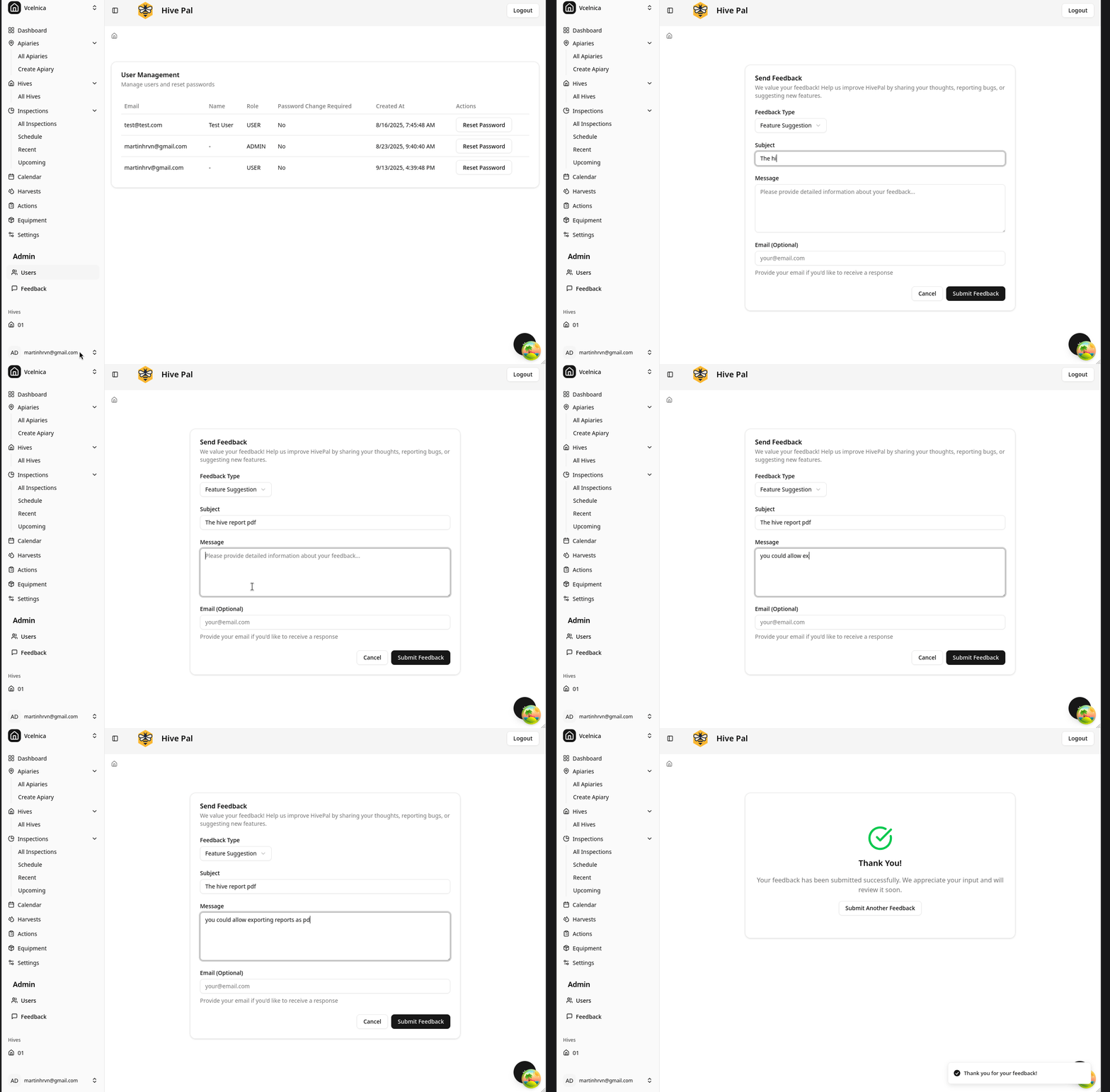
Quick Steps
- Click the Feedback button in the app menu
- Select feedback type (bug report, feature request, or general feedback)
- Write your message with specific details
- Optionally attach screenshots for clarity
- Submit your feedback
Feedback Types
- Bug Reports: Describe issues with steps to reproduce
- Feature Requests: Suggest new features or improvements
- General Feedback: Share your experience or suggestions
Tips for Good Feedback
- Be specific about what happened or what you'd like to see
- Include relevant details like hive/apiary names if applicable
- Attach screenshots when reporting visual issues
- Mention the steps that led to an issue
What Happens Next
Your feedback is reviewed by the development team and prioritized based on impact and feasibility. You'll receive updates through the app when your feedback is addressed in new releases.
Related Features
- FAB Actions - Quick access to common tasks
- Overview - Understanding the dashboard